
Baby Panda World-Learning Game
BabyBusEducational
4.42.14K Reviews
- Version
- 8.39.40.10
- Installs
- 100.00M
- Age Rating
- Everyone
Screenshots



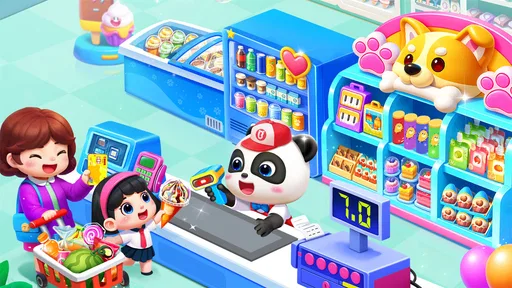
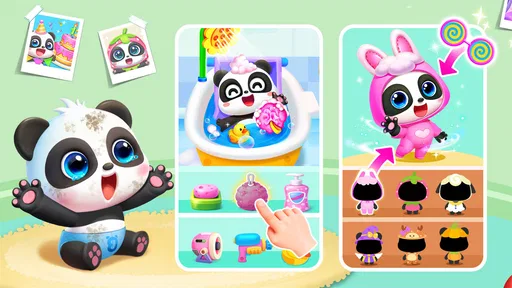
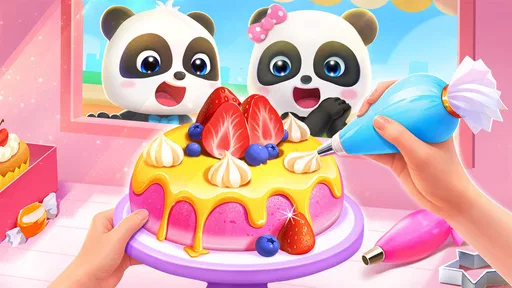
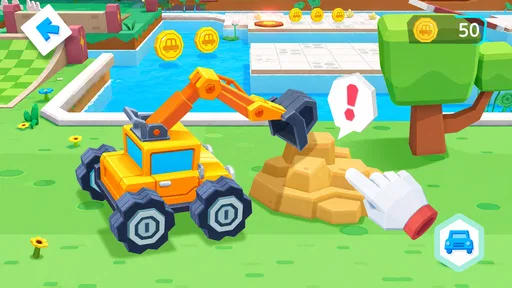
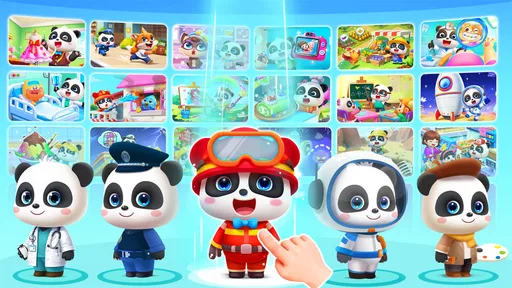
Our Review of Baby Panda World-Learning Game
 Analysis by Appyee
If you’re looking for a way to give a young child a short, hands-on activity on a phone or tablet, Baby Panda World may be worth a look. I see it less as one game with a single goal and more as a collection of playful experiences for little learners. That variety can make it easier to find something that suits a child’s mood, though it also means the app is best approached as a place to explore rather than a structured course.
Exploring Baby Panda World
BabyBus makes this educational game, which brings games, animations, and children’s songs together in one app. The mix is useful when a child’s attention shifts quickly: a parent can offer a different kind of activity without immediately moving to another app. Its audience is rated Everyone, and the game is free to download. It has an average rating of 4.1 from around 442,000 ratings, with more than 100 million installs, so it has clearly reached a very large audience of families.
First off, when you open Baby Panda World, it feels like stepping into a colorful, vibrant universe. The app boasts a plethora of activities, each designed to engage children while fostering creativity and critical thinking. You’ll find everything from cooking games and supermarket adventures to art classes and musical journeys.
The interface is super kid-friendly, with large icons and intuitive navigation. Even if your kiddo is on the younger side, they’ll have no trouble bouncing between activities. I loved how the app uses vivid colors and adorable animations to capture attention. Honestly, I found myself getting sucked into some of the games, too! It’s like a mini theme park right on your phone.
Learning through play, with a parent nearby
Let’s talk about the educational aspect, which is probably what you’re most interested in. The app is designed to develop a variety of skills. For example, in the cooking game, children can learn about different ingredients, follow recipes, and understand basic math through measuring. It’s a sneaky way to introduce them to concepts that they’ll encounter later in school.
Then there’s the supermarket game, where kids can learn about money and budgeting. It’s quite a clever approach, allowing them to "purchase" items and manage a virtual shopping list. You’ll be surprised at how quickly they pick up these skills while having fun.
I’d treat these as prompts for conversation, not proof that a child has mastered a subject. When my child measures ingredients in a pretend recipe, I can ask what might happen if we add more, or connect the activity to cooking at home. In the shopping scenario, asking them to explain why they chose one item over another turns tapping into a chance to talk about choices. The adult’s involvement is what helps bridge a playful screen activity and something a child can use away from the device.
Interactive play and practical trade-offs
One of the standout features is the app’s interactivity. Unlike some apps that just throw information at kids, Baby Panda World encourages them to actively participate. Whether it’s decorating a cake or playing a musical instrument, the app ensures that children are not just passive observers.
The app also includes social elements, allowing kids to "interact" with characters and complete tasks collaboratively. This feature is fantastic for improving social skills and teaching the importance of teamwork.
For a family, the strongest everyday use may be a brief, shared activity while waiting for food at a restaurant or filling a quiet stretch at home. I’d choose one activity together, let the child try it, then ask them to describe what they did. That makes the game easier to supervise and gives the session a natural stopping point. If you want a child to play independently for a long time, or need a curriculum with lessons that build in a carefully tracked sequence, this broad collection may not be the best fit.
Keeping playtime within family limits
As a parent, I appreciate the robust parental controls. You can set limits on how long your child can play, which is a huge relief for those of us who worry about screen time. The app also provides detailed reports on what your child has been doing, so you can keep track of their progress and areas of interest.
I’d still make a habit of exploring the app alongside a child before handing over the device. That lets you see which activities they gravitate toward and agree on a stopping point before they begin. It is also a practical way to check whether the mix of play, songs, and animations fits your household’s preferences. A child who is easily drawn from one activity to the next may need a clear “one activity, then we’re done” routine rather than an open-ended turn.
Creativity, variety, and what to expect
Creativity is at the heart of Baby Panda World. The app allows kids to express themselves through art and music. They can draw, paint, and even compose their own tunes. The customization options are endless, letting children personalize their experiences. It’s like a digital playground where creativity knows no bounds.
Plus, the app keeps things fresh by regularly updating with new content and activities. This ensures that kids never get bored and always have something new to explore.
That variety is a real advantage over a narrowly focused alphabet or number-learning app: a child can move among pretend cooking, shopping, art, music, animations, and songs instead of repeating one kind of exercise. The trade-off is that variety does not automatically mean a clear learning path. If your main aim is repeated practice of a specific skill, a focused learning app, a storybook, or an offline activity may be easier to use consistently. I’d pick Baby Panda World for playful discovery, not as a replacement for reading together, real-world play, or a teacher’s learning plan.
Purchases, fairness, and choosing the right fit
The download is free, but the game offers in-app purchases priced from $1.99 to $41.99 per item. That range is worth discussing with a child before they start, especially if they can navigate the device without help. I would check the purchase options and the device’s purchase settings with an adult account first, then agree on a simple rule: purchases are not part of ordinary play unless a parent approves them. I can’t assess the value of individual items or what each one unlocks from the price range alone, so I wouldn’t assume that paying is necessary to enjoy the app.
Fairness matters differently here than it does in a competitive game. Baby Panda World is aimed at children’s play and learning, not at ranking players against one another, so spending should be considered as a family budget question rather than a way to gain an edge over other children. If you prefer a completely fixed-cost experience with no purchase prompts to manage, a paid app with a single upfront price may suit you better; if you are comfortable reviewing optional purchases with your child, the free download gives you a way to try the general experience first.
Final Thoughts
In conclusion, Baby Panda World is more than just a game; it’s an educational tool wrapped in a fun and engaging package. It’s perfect for parents who want to give their kids a head start on learning while ensuring they’re having a blast. The app is well-designed, easy to navigate, and packed with activities that cater to a wide range of interests.
Whether your child is into cooking, art, or music, there’s something here for everyone. So, if you’re looking for an app that combines fun with education, I’d highly recommend giving Baby Panda World a try. It’s like having a world of learning right at your fingertips.
Details worth checking before installing
The current version is 8.39.39.11, and it requires Android 5.0 or later. It was released on November 10, 2019, and the listing shows 2,100 reviews alongside its much larger rating count. Those details can help you judge basic compatibility and how long the app has been available, but they do not tell me how it will run on a particular device or whether every activity will suit your child. I’d install it on the device your family actually plans to use and explore together before making it part of a routine.
One useful approach is to let a child sample different activity types over several short sessions rather than trying to tour everything at once. Notice whether they return to pretend shopping, music, or drawing, then use that preference to start a conversation or an offline activity. For instance, after a supermarket game, you could invite them to help sort a few real groceries; after making music, you could listen together and tap out a rhythm. The app works best as a springboard for interaction, not as a substitute for it.
Families who want a simple, self-contained game with one clear objective may find this collection a little scattered. Likewise, if a child is not yet comfortable navigating touchscreens, an adult may need to help them choose activities and make sense of the play. I’d skip it if your priority is a tightly sequenced academic program, or if you want a device experience with no in-app purchase options. For a young child who enjoys switching between imaginative tasks and creative play, though, the breadth is precisely the appeal.
A measured trust verdict
My overall view is positive, with a parent’s usual caveat: the app’s appeal comes from its variety, while the family still sets the boundaries. BabyBus has made a recognizable children’s world that can fill a short gap in the day and give an adult easy openings for questions about food, shopping, art, or sound. I would not treat its activities or progress reports as a formal assessment of learning, and I would review spending options before a child uses it alone.
If you’re deciding whether to try it, the practical question is less “Will this teach everything?” and more “Will my child enjoy exploring these activities with sensible limits?” The free download makes that initial test straightforward, while optional purchases call for adult oversight. For casual, shared educational play on Android, it’s a reasonable choice; for structured lessons, a purchase-free setup, or a single focused skill, another kind of app or an offline activity may be a better match.
Privacy and Permissions
See what permissions an app requests and how it handles your data.
- Wi-Fi connection information
- view Wi-Fi connections
- Other
- view network connections, full network access, control vibration, prevent device from sleeping
Verdict
Strengths of Baby Panda World-Learning Game
- Engaging educational content for kids.
- Vibrant graphics capture children's attention.
- Variety of mini-games keeps it interesting.
- Parental controls ensure safe usage.
- Easy-to-navigate interface for young users.
Limitations of Baby Panda World-Learning Game
- In-app purchases may add up quickly.
- Requires constant internet for full features.
- Ads can disrupt game flow.
- Limited language options available.
- High storage usage on devices.
Other Releases by BabyBus
View All
Little Panda Policeman
Educational4.0

Little Panda's Chinese Recipes
Educational4.4

Little Panda's Restaurant
Educational4.4

Little Panda's Ice Cream Games
Educational4.3
Similar Picks in This Category
View AllLittle Panda Policeman
BabyBus4.0

Monster Trucks Game for Kids 2
Raz Games4.1
Little Panda's Chinese Recipes
BabyBus4.4
Little Panda's Restaurant
BabyBus4.4
Little Panda's Ice Cream Games
BabyBus4.3

Baby Panda Care
BabyBus3.8
You May Also Like
View All
Frequently Asked Questions
What age group is Baby Panda World-Learning Game suitable for?
Baby Panda World-Learning Game is designed for children aged 3 to 8 years old. The game offers a variety of activities and educational content tailored to this age group, ensuring that young learners can engage with the material in a fun and interactive way. The app's colorful graphics and easy-to-use interface make it accessible for preschoolers and early elementary students.
Is Baby Panda World-Learning Game safe for my child to use?
Yes, Baby Panda World-Learning Game is designed with child safety in mind. The app contains no third-party advertisements and features parental controls to manage in-app purchases. Additionally, the content is age-appropriate, focusing on educational themes that promote learning and development in a secure digital environment.
Does Baby Panda World-Learning Game require an internet connection?
While Baby Panda World-Learning Game can be enjoyed offline, an internet connection is necessary for initial download and updates. Some features, such as additional content packs or community interactions, might also require internet access. However, the core educational games can be accessed without a constant connection, making it convenient for travel or areas with limited internet availability.
What educational topics does Baby Panda World-Learning Game cover?
Baby Panda World-Learning Game covers a wide range of educational topics, including math, language, science, and creativity. The app incorporates these themes into interactive games and activities, helping children develop essential skills such as problem-solving, critical thinking, and creativity. The diverse content ensures that children remain engaged while learning important concepts.
Can multiple children use Baby Panda World-Learning Game on the same device?
Yes, Baby Panda World-Learning Game supports multiple user profiles on the same device. This feature allows each child to have a personalized experience, with progress tracked individually. Parents can set up separate profiles for each child, ensuring that the app tailors the learning experience to the specific needs and abilities of each user.
Play our best games!


